How to Read an Instrument Approach Chart
A section-by-section walkthrough using the ILS or LOC RWY 2 approach into Glacier Park International (GPI), Kalispell, Montana.
The Big Picture
An instrument approach chart (also called an approach plate) packs everything you need to fly an instrument approach onto a single page. That's a lot of data in a tight space, but every chart follows the same structure. Once you learn the layout, you can brief any plate in the system.
This particular chart is worth studying because its title — ILS or LOC RWY 2 — tells you it's actually two approaches in one. The ILS is a precision approach with both lateral and vertical guidance, while the LOC (localizer-only) is a non-precision fallback that provides only lateral guidance. Both use the same course and fixes, but they have different descent profiles, different minimums, and different decision points. As we walk through each section, we'll highlight where these differences show up.
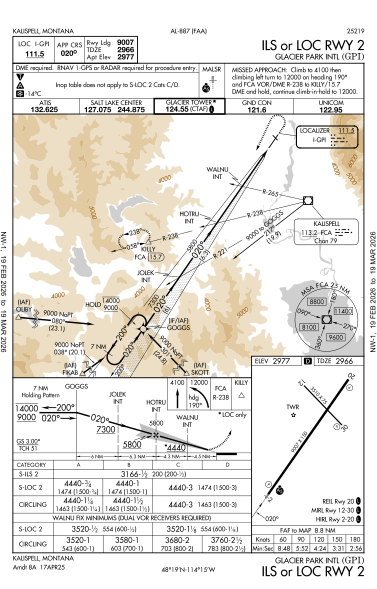
Every FAA approach plate follows the same top-to-bottom layout. Click any area on the chart above to jump straight to its explanation, or scroll through all ten sections below:
The Chart Layout
- 1. Top Briefing Strip — procedure name, airport, frequencies, course, and runway data
- 2. Notes & Requirements — equipment requirements, special symbols, and restrictions
- 3. Approach Lighting & Missed Approach — the ALS configuration and the full missed approach procedure
- 4. Communications — radio frequencies in the order you'll use them
- 5. Plan View — the bird's-eye map of the approach route, terrain, navaids, and obstacles
- 6. MSA — Minimum Safe Altitudes for emergency use, by sector
- 7. Profile View — the side-on descent path with altitudes, fixes, and ILS vs LOC differences
- 8. Minimums — decision altitudes, MDAs, and required visibility by aircraft category
- 9. Airport Sketch — runway layout, dimensions, elevation, and lighting
- 10. Time & Speed — FAF-to-MAP timing at various groundspeeds
1. Briefing Strip & Identification
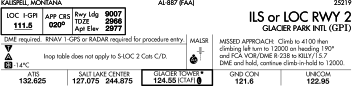
The first thing you do with any approach plate is confirm you have the right chart. The procedure name is printed in large type on both the top-right and bottom-right of the page:
ILS or LOC RWY 2 — this tells you two things: the type of approach (ILS with a localizer-only fallback) and the runway (Runway 2). Below that: GLACIER PARK INTL (GPI), the airport name and identifier.
The Briefing Box
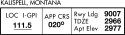
The boxed section in the upper left holds the numbers you need to set up for the approach:
| Field | Value | What It Means |
|---|---|---|
| LOC I-GPI | 111.5 | The localizer identifier and frequency. Tune your NAV radio to 111.5 and confirm you receive "I-GPI" in Morse code. |
| APP CRS | 020° | The final approach course — set your course selector (OBS) to 020°. |
| Rwy Ldg | 9007 | The runway landing distance available, in feet. |
| TDZE | 2966 | Touchdown Zone Elevation — the elevation in feet MSL at the approach end of the runway. |
| Apt Elev | 2977 | The official airport elevation in feet MSL. |
Margins & Validity
The vertical margins on the left and right edges show the chart's effective dates. This plate reads NW-1, 19 FEB 2026 to 19 MAR 2026. Always verify your chart is current before flying the approach. Across the top you'll also see AL-887 (FAA), the FAA's internal chart identification number, and 25219, the volume number.
2. Notes, Requirements & Symbols

Directly below the briefing box is a critical strip of information. Read this carefully — it determines whether you're allowed to fly this approach with your aircraft and equipment.
Equipment Requirements
The top line reads: "DME required. RNAV 1-GPS or RADAR required for procedure entry." This means:
- Your aircraft must have Distance Measuring Equipment (DME) or an equivalent (e.g., GPS-derived DME).
- To enter the procedure, you need either RNAV 1-level GPS or radar vectors from ATC. You can't just navigate to an IAF with a VOR alone.
The Symbol Strip
Below the requirements line you'll see three symbols on the left side. Each one is a flag that means something specific:
| Symbol | Meaning |
|---|---|
 |
Non-standard takeoff minimums. If you depart from this airport on instruments, don't assume standard takeoff minimums apply. Look up the airport in the FAA's Takeoff Minimums and Departure Procedures section of the Terminal Procedures Publication (TPP). |
 |
Non-standard alternate minimums. If you file GPI as your alternate airport, the usual 600-2 / 800-2 alternate minimums don't apply. Check the TPP for the actual requirements. |
 |
Cold temperature restriction. When the airport temperature drops below -14°C, you must apply cold-temperature altitude corrections to the procedure's altitudes. Cold air is denser and altimeters read higher than true altitude — this correction keeps you safe from terrain. |
Inop Table Note
The note "Inop table does not apply to S-LOC 2 Cats C/D" tells you that the standard inoperative-component table (the one that normally adjusts minimums when lighting or other equipment is out of service) doesn't apply to the Straight-In Localizer approach for Category C and D aircraft. Those categories have their minimums set independently.
3. Approach Lighting & Missed Approach
Approach Lighting System (ALS)
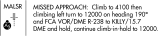
In the center of the notes bar you'll see a box labeled MALSR with a small icon showing the light pattern. MALSR stands for Medium Intensity Approach Lighting System with Runway Alignment Indicator Lights. This is what you'll be looking for as you break out of the clouds — a row of sequenced flashing lights leading to the runway threshold. The icon gives you a rough picture of the light configuration so you know what to expect visually.
Beside the MALSR box is a small circled figure labeled A5. This is the approach lighting system configuration code, which corresponds to a specific layout described in the TPP legend.
Missed Approach Procedure
On the right side of this strip, you'll find the full text of the missed approach procedure:
Translated into plain English: if you reach decision altitude and don't have the runway in sight, climb straight ahead to 4,100 feet, then turn left to a heading of 190°. Continue climbing to 12,000 feet while tracking outbound on the FCA VOR radial 238 to the fix KILLY (which is 15.7 DME from FCA). Enter the holding pattern at KILLY and continue climbing in the hold until you reach 12,000 feet.
4. Communications Box

The frequency box lists every radio frequency you'll need, conveniently arranged from left to right in roughly the order you'll contact them during the approach:
| Facility | Frequency | When You Use It |
|---|---|---|
| ATIS | 132.625 | Before you begin — get the current weather and active runway information. |
| SALT LAKE CENTER | 127.075 / 244.875 | En route — the controlling ARTCC facility. The second frequency is UHF (military). |
| GLACIER TOWER ★ | 124.55 (CTAF) | The control tower frequency. The star (★) means the tower is part-time — check the Chart Supplement for hours. When the tower is closed, 124.55 becomes the CTAF. The L symbol indicates the tower has radar. |
| GND CON | 121.6 | Ground control — after landing, for taxi instructions. |
| UNICOM | 122.95 | For airport advisory services (fuel, parking, etc.). |
5. Plan View (The Map)
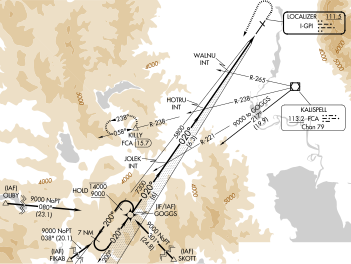
The plan view is the largest section of the plate. It's a top-down map showing the approach route, the terrain, navaids, fixes, and obstacles. Think of it as a sectional chart zoomed way in and focused on just this approach.
The Approach Route
The heavy black lines with arrowheads show the approach path. This procedure has multiple entry points, called Initial Approach Fixes (IAFs). You can identify them by the (IAF) label above the fix name. This chart has four:
| IAF | Entry | Notes |
|---|---|---|
| OLIBY | From the west | 9000 NoPT — enter at 9,000 ft, no procedure turn required. |
| FIKAB | From the south-southwest | 9000 NoPT along the 038° bearing (20.1 DME). No procedure turn required. |
| SKOTT | From the southeast | 9000 NoPT along the 301° bearing (24.8 DME). No procedure turn required. |
| GOGGS | Any direction (also labeled IF/IAF) | Both an Initial Approach Fix and Intermediate Fix, at 7,300 ft (6.0 DME from FCA on R-221). If arriving from a direction without a charted NoPT route, fly the holding pattern at GOGGS for course reversal. |
The label "NoPT" next to a route means No Procedure Turn — if you enter from that IAF on the charted route, you proceed straight in without a course reversal. If you arrive from a direction that isn't one of these charted feeder routes, you'd fly the procedure turn (the barbed racetrack pattern shown near the final approach course).
Altitude Restrictions
Along the feeder routes you'll see altitude numbers with specific formatting:
- Underlined number (e.g., 9000) = fly at or above that altitude.
- Overlined number = fly at or below that altitude.
- Both underlined and overlined = when it's a single value, that's a mandatory altitude — fly at exactly that number. When you see two values both with lines above and below, it defines an altitude window (commonly at a holding pattern) — maintain between those two altitudes.
Fixes and Intersections
Along the final approach course (heading 020°), you'll see several fixes marked as triangles or intersection symbols:
- GOGGS (IF/IAF) — the intermediate fix at 7,300 ft.
- JOLEK INT — an intermediate stepdown fix on the localizer course.
- HOTRU INT — another fix used for the localizer step-down descent.
- WALNU INT — a critical fix used for localizer-only minimums.
The Localizer Course
In the upper-right area of the plan view you'll see a depiction of the localizer antenna at the far end of Runway 2, labeled LOCALIZER 111.5 / I-GPI. The feathered symbol represents the localizer signal fanning out along the 020° course.
Navaids
The plan view shows the Kalispell VOR/DME (FCA) at 113.2 MHz, Channel 79, depicted with the standard VOR compass-rose symbol to the east of the airport.
Terrain and Obstacles
The shaded brown contours represent rising terrain — and there's plenty of it near Kalispell. This is mountainous country in northwest Montana, with elevations reaching well above the approach altitudes to the east.
Missed Approach Route
The dashed line extending from the runway area shows the missed approach path — climbing and turning left to heading 190° then tracking outbound on the FCA R-238 to KILLY at 15.7 DME.
6. Minimum Safe Altitude (MSA)

You'll find the MSA circle tucked into the plan view, usually in the upper-right corner. It gets its own section here because it serves a different purpose from the approach itself — it's your emergency safety net, not part of the normal procedure. This one is labeled MSA FCA 25 NM, meaning the Minimum Safe Altitudes are centered on the FCA VOR and valid within 25 nautical miles.
The circle is divided into four sectors. The degree markings on the diagram show the bearing to the VOR from each sector boundary — use them to determine which sector you're in based on your position relative to the station:
| Sector | MSA | Why |
|---|---|---|
| Southwest (360°–090°) | 8100 ft | Flathead Valley — the lowest terrain around the airport. |
| Northwest (090°–180°) | 8800 ft | Rising terrain toward the north fork of the Flathead River valley. |
| Northeast (180°–270°) | 11400 ft | The highest sector — rugged peaks east of Kalispell, near Glacier National Park. |
| Southeast (270°–360°) | 9600 ft | Mountain ridges south and east of the airport. |
7. Profile View (The Side View)
If the plan view is the map, the profile view is the cross-section. It shows the same approach from the side so you can visualize the descent path and the altitude at each point. Remember — this chart contains two approaches in one. Use the selector below to compare how the profile differs between the ILS and LOC approaches:
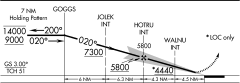
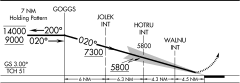
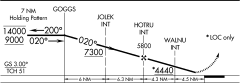
The profile view as published — both ILS and LOC information overlaid on a single diagram. Toggle between ILS and LOC to see what applies to each approach.
ILS Approach
With the full ILS, you have both lateral guidance (localizer) and vertical guidance (glideslope). The lightning-bolt arrow marks the PFAF — the precision final approach fix — where you intercept the glideslope at the published GS intercept altitude and ride it down in a smooth, continuous descent to decision altitude.
Decision Altitude
Visibility Required
Glideslope
Descent Method
LOC Approach
Without the glideslope, you have lateral guidance only. The chart shows step-down fixes with minimum altitudes for each segment — but you're not required to descend in a staircase pattern. You can fly a continuous descent as long as you remain at or above the minimum altitude for each segment. Many pilots prefer a stabilized, continuous descent to MDA rather than the "dive and drive" staircase technique, and either method is acceptable.
If you can identify the WALNU intersection using dual VOR cross-radials, the MDA drops significantly — from 4,440 ft down to 3,520 ft. That's a big difference, and a good example of how additional navigation capability can earn you lower minimums on a non-precision approach. Use the toggle below to compare:
MDA
Visibility (Cat A-B / C-D)
Step-Down Fixes
Descent Method
MDA
Visibility (Cat A/B/C-D)
Step-Down Fixes
Descent Method
Reading Left to Right
Now let's walk through the profile view itself. It reads left to right, starting from the missed approach holding pattern and ending at the runway. Here's every fix and altitude you'll encounter along the way:
| Fix/Point | Altitude | Notes |
|---|---|---|
| GOGGS hold | 14000 / 9000 | The holding pattern. Inbound course 020°, outbound 200°. Maximum holding altitude 14,000; minimum 9,000. |
| JOLEK INT | 7300 (underlined) | Cross at or above 7,300 ft on the localizer course (020°). |
| HOTRU INT | 5800 | Step-down fix — descend to cross at or above 5,800 ft. |
| WALNU INT | *4440 | The asterisk and "LOC only" label mean this altitude applies only to the localizer approach. Cross at or above 4,440 ft. |
| Glideslope intercept | 5800 | The lightning-bolt (jagged) arrow marks the precision FAF (PFAF) — where you intercept the glideslope at 5,800 ft. This is both the FAF for the ILS approach and the GS intercept altitude. |
| Runway 2 | TDZE 2966 | Touchdown zone elevation. |
Glideslope Information
In the lower left of the profile view you'll see:
- GS 3.00° — the glideslope angle is 3.0 degrees, which is standard.
- TCH 51 — the Threshold Crossing Height is 51 feet.
FAF Symbology
The profile view uses two different symbols for the Final Approach Fix:
- The lightning-bolt (jagged) arrow marks the precision FAF (PFAF) for ILS approaches — it indicates both the final approach fix and the glideslope (GS) intercept altitude. This is where you should be established on the glideslope for your descent.
- The Maltese cross marks the FAF for non-precision approaches (LOC) — where you begin your descent to MDA.
Segment Distances
Along the bottom of the profile view, distance markers show the length of each segment: 6 NM → 6.3 NM → 4.3 NM → 4.5 NM.
Missed Approach Icons

Above the profile view, a boxed inset shows the missed approach as a series of icons — a quick visual reference for the text in the briefing strip.
8. Landing Minimums
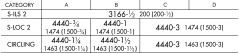
This is the section that answers the most important question: how low can I descend, and how much visibility do I need? You saw the key numbers in the profile view comparison above — now let's look at how to read the minimums table itself, including the notation and what changes by aircraft category.
Aircraft Categories
| Category | Vref Range |
|---|---|
| A | < 91 knots |
| B | 91–120 knots |
| C | 121–140 knots |
| D | 141–165 knots |
S-ILS 2 (Straight-In ILS to Runway 2)
The minimums read: 3166-½ 200 (200-½)
- 3166 — Decision Altitude (DA) in feet MSL.
- ½ — Required visibility: ½ statute mile.
- 200 — Height Above Touchdown (HAT). You'll be 200 feet above the runway at DA.
- (200-½) — The numbers in parentheses are for military operations.
S-LOC 2 (Straight-In Localizer to Runway 2)
| Category | MDA / Visibility | HAT |
|---|---|---|
| A | 4440-¾ | 1474 ft |
| B | 4440-1 | 1474 ft |
| C & D | 4440-3 | 1474 ft |
CIRCLING
| Category | MDA / Visibility | HAA |
|---|---|---|
| A | 4440-1¼ | 1463 ft |
| B | 4440-1½ | 1463 ft |
| C & D | 4440-3 | 1463 ft |
Note that circling minimums use HAA (Height Above Airport) instead of HAT, since you're not lined up with a specific touchdown zone.
WALNU Fix Minimums

Below the main minimums table, there's a separate set of lower minimums labeled "WALNU FIX MINIMUMS (DUAL VOR RECEIVERS REQUIRED)." If you can identify WALNU intersection (which requires two VOR receivers), you get significantly lower localizer minimums — an MDA of 3,520 ft instead of 4,440 ft. That's nearly a 1,000-foot improvement.
9. Airport Sketch
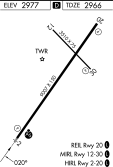
The airport sketch in the lower-right corner gives you a bird's-eye view of the airport layout:
- D symbol — the D at the top of the sketch indicates that declared distances are available for this airport in the Airport/Facility Directory (AF/D). Declared distances (TORA, TODA, ASDA, LDA) represent the maximum distances available and suitable for meeting takeoff and landing distance performance requirements.
- Runway 2/20 — the primary runway, 9,007 × 150 feet.
- Runway 12/30 — a crossing runway, 3,510 × 75 feet.
- ELEV 2977 — airport elevation.
- TDZE 2966 — touchdown zone elevation for Runway 2.
Runway Lighting
- REIL Rwy 20 — Runway End Identifier Lights on Runway 20.
- MIRL Rwy 12-30 — Medium Intensity Runway Lights on the crossing runway.
- HIRL Rwy 2-20 — High Intensity Runway Lights on the primary runway.
The L symbols indicate that pilot-controlled lighting is available.
10. Time & Speed Table
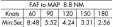
At the very bottom you'll find a small table showing the time from the Final Approach Fix (FAF) to the Missed Approach Point (MAP). The distance is 8.8 NM:
| Groundspeed (kt) | 60 | 90 | 120 | 150 | 180 |
|---|---|---|---|---|---|
| Time (min:sec) | 8:48 | 5:52 | 4:24 | 3:31 | 2:56 |
This table is primarily useful for the localizer approach, where timing from the FAF is your backup method for identifying the Missed Approach Point. On the ILS, the MAP is the decision altitude — you go missed when you reach DA without the runway in sight. On the LOC, if you don't have DME or GPS to identify the MAP fix, you start your timer crossing the FAF and go missed when the time expires at your groundspeed.
11. Putting It All Together
You've now worked through every section of the approach plate. The real test is whether you can pull it all together into a coherent approach brief — the kind you'd give before starting the approach. Here's how that sounds for this chart:
"This is the ILS or LOC Runway 2 into Glacier Park International, Kalispell. Chart is current. The localizer frequency is 111.5, identifier I-GPI, inbound course 020°. The glideslope is 3.0 degrees, threshold crossing height 51 feet. Touchdown zone elevation is 2,966 feet.
DME is required, and we need RNAV-1 GPS or radar for procedure entry. We'll get vectors from Salt Lake Center on 127.075 and expect to be handed off to Glacier Tower on 124.55.
For the ILS, our decision altitude is 3,166 feet — that's 200 feet above touchdown. We need half-mile visibility.
Missed approach: climb to 4,100, left turn climbing to 12,000 on heading 190°, then track FCA R-238 out to KILLY at 15.7 DME and hold. Continue climbing in the hold to 12,000.
MALSR approach lighting on Runway 2. HIRL on the runway, pilot-controlled."
Key Takeaways
- Always verify you have the correct, current chart before briefing.
- Check the notes section for equipment requirements and restrictions.
- Know whether you're flying the ILS (precision) or LOC (non-precision) version.
- Brief the missed approach before you need it.
- Use the right minimums for your approach type and aircraft category.
- The MSA circle is for emergencies only.
- Timing from the FAF is your backup for identifying the MAP when DME or GPS isn't available.
Test Your Knowledge
See how well you understood the approach plate. Click an answer to check — you'll get an explanation either way.